An Identity Management System is a collection of processes and technologies used to manage and secure user identities within an organization.
What Is an Identity Management System? 6 Key Components
An Identity Management System is a collection of processes and technologies used to manage and secure user identities within an organization. It covers functions such as user provisioning, role-based access control, password management, and auditing, among others. Its main goal is to make sure only authorized individuals can access the organization’s resources, which protects sensitive data and systems.
IMS is becoming an essential component of IT infrastructure for organizations of all sizes. With an effective IMS, businesses can control who accesses their data, when, and how. This helps prevent unauthorized access and supports compliance with data protection regulations.
This is part of a series of articles on identity access management.
Components of an Identity Management System
1. Identification
Identification is the first component of an IMS. It recognizes a user within the system and tracks that user consistently across different organizational systems. Every other process in the IMS builds on it.
Recognizing a user does not necessarily grant access. Other components of the IMS decide which resources that user can reach.
2. Authentication
Authentication is the second component of the IMS. It verifies that the recognized user is who they claim to be, usually with passwords, security questions, or biometric data. This check helps keep unauthorized users out of the system.
While passwords remain the most common form of authentication, businesses are increasingly adopting multi-factor authentication (MFA). MFA requires two or more independent credentials. For instance, a user may have to enter a password and then a one-time password (OTP) sent to their mobile device.
3. Authorization
Once a user has been identified and authenticated in the system, the next step is authorization. Authorization decides what resources the user can access and what actions they can perform. Authorization is typically based on predefined roles and policies.
For instance, a finance officer may be authorized to access financial records but not human resource records. Similarly, a system administrator may have the authority to modify system configurations, unlike a regular user. Clear roles and access rights limit each user to the resources their role needs, which reduces the risk of data breaches.
4. User Management
User management involves the creation, modification, and deletion of user accounts. This process should be carried out by a dedicated team to ensure consistency and security.
User management also includes managing user roles and access rights. This should be done in line with the organization’s policies and procedures. For instance, when an employee leaves the organization, their access rights should be promptly revoked to prevent unauthorized access.
5. Directory Services
Directory services provide a centralized repository for storing and managing user identities and their associated attributes. Directory services enable businesses to organize, find, and control information about users and resources in the network. For standards-based directory synchronization, see how SCIM provisioning works across SaaS tenants.
Directory services can be implemented using various protocols, such as LDAP (Lightweight Directory Access Protocol) and Active Directory.
6. Compliance Management
Identity management systems also help the organization comply with data protection laws and regulations. This might involve implementing controls to protect user data and prevent unauthorized access, such as encryption, access control, auditing, and incident response.
Some identity management systems provide built-in support for specific rules and guidelines set by regulatory bodies. For instance, they could help organizations meet the specific requirements of the Payment Card Industry Data Security Standard (PCI DSS) or the EU General Data Protection Regulation (GDPR).
Types of Identity Management Systems
Centralized Identity Management
Centralized identity management is a system where all user identities are stored and managed in a single, central location. This makes it simpler to manage user access across systems and applications. The risk is that a single breach can expose all user identities. Many businesses still prefer centralized identity management because it is easy to administer and cost-effective.
Example use cases:
Centralized identity management is widely used in organizations where all the systems and resources are managed under a single administrative domain. For example, a multinational corporation that uses a single sign-on system for all its employees, regardless of their location or department, employs a centralized IMS. This allows employees to access various services (like email, HR systems, internal databases) using a single identity. The central IMS also makes it easier for administrators to manage identities and enforce organization-wide policies.
Decentralized Identity Management
In contrast to centralized systems, decentralized identity management employs a distributed network to store and manage user identities. Each user’s identity is stored on their device, reducing the risk of a single point of failure. This improves security, but it can be harder to manage and maintain because the identities are distributed.
Example use cases:
Decentralized identity management fits scenarios that prioritize privacy and user control over identities. A good example is blockchain-based systems, where user identity is stored and managed on distributed nodes.
The healthcare sector can use this model to protect patient privacy. For example, a patient’s health records can be linked to their decentralized identity, giving them full control over who accesses their information. Patients can then share their data selectively with different healthcare providers, with less risk of a centralized data breach.
Federated Identity Management
Federated identity management allows users to use the same identity to access multiple systems or applications. It is a trust-based system where different organizations agree to trust identities validated by the other. This system reduces the need for users to remember multiple passwords and eliminates the need for businesses to manage numerous user identities. However, it requires a high level of trust among all participating organizations.
Example use cases:
Federated identity management is best suited for scenarios involving inter-organizational trust relationships. A typical example is the academic sector. Universities often collaborate on research projects, and federated IMS allows researchers from different institutions to access shared resources using their home institution credentials.
Researchers don’t have to manage multiple sets of credentials. Similarly, businesses that use Software-as-a-Service (SaaS) applications can use federated identity management to allow employees to access multiple applications with a single set of credentials.
How Identity Management Systems Work
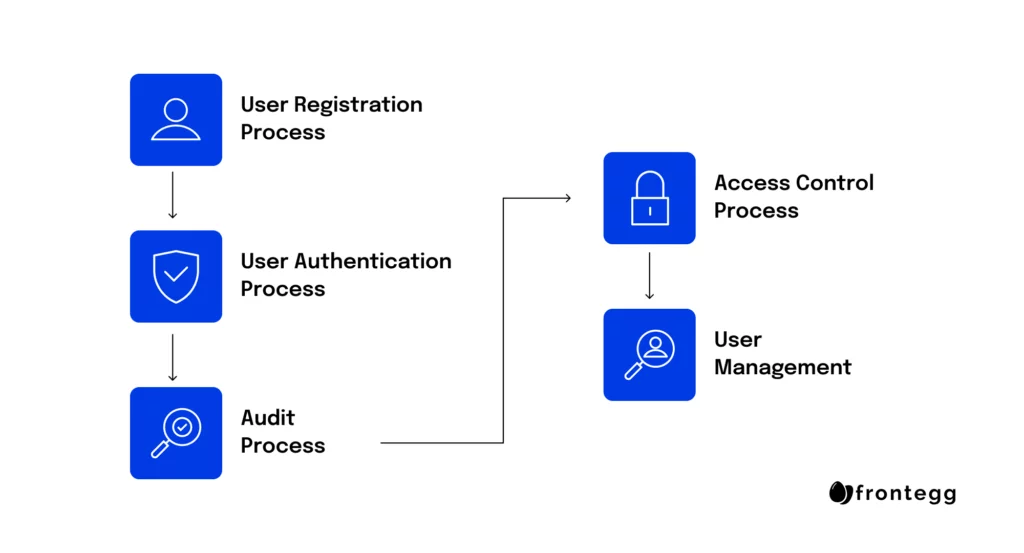
Here are the primary processes involved in identity management:
User Registration Process
The first step in any IMS is user registration, where the system collects user information and stores it securely. Registration verifies the user’s identity and establishes their access rights within the system. This information is usually collected via a registration form, and the user is then provided with credentials (such as a username and password) that they will use to access the system.
User Authentication Process
After registration, the next step is user authentication. This process verifies the identity of the user each time they attempt to access the system. The most common method of authentication is through the use of credentials provided during registration. However, other methods such as biometrics, tokens, or two-factor authentication may also be used to enhance security.
Access Control Process
Once a user’s identity has been verified through the authentication process, the system then determines what resources the user is allowed to access. This is known as the access control process. It involves checking the user’s access rights against a database and granting or denying access based on this information. This keeps the system secure by limiting each user to appropriate resources.
User Management
This process involves monitoring user activity within the system, managing user access rights, and conducting regular audits to ensure that the system remains secure. Ideally, all user activity should be visible in one centralized dashboard. Without one, user activity is hard to follow across today’s complex ecosystems of applications.
Audit Process
Every modern IMS includes an audit process, which identifies potential security threats and confirms that the system is functioning as intended. Periodic audits matter most in SaaS, where use cases keep multiplying and compliance requirements keep growing.
Core Principles of Identity Management
Whatever system you choose, these principles decide whether it stays secure as users and applications are added:
- Least privilege. Give each user only the access their job needs, and review it as their role changes.
- Roles, not individual grants. Assign permissions to roles and users to roles, so access stays consistent and easy to audit.
- Zero trust. Authenticate and authorize every request, including requests from inside the network.
- Single sign-on. One sign-in across applications means fewer passwords to reuse or phish.
- Multi-factor and passwordless authentication. Require a second factor, use adaptive MFA to step up only on risky sign-ins, and move users toward passkeys and other passwordless methods.
Best Practices for Implementing Identity Management
- Start from your requirements. Audit current systems for gaps, plan for growth, and list the privacy and industry regulations the system must meet.
- Write lifecycle policies. Define how identities are created, changed and retired, who owns each step, and how security incidents are handled.
- Review access regularly. Remove access that users no longer need, watch for unusual access patterns, and revoke access as soon as someone leaves or changes role.
- Automate provisioning. Automated provisioning and deprovisioning, for example through SCIM, removes manual errors and closes access promptly.
- Train users. Teach people to recognize phishing and report suspicious sign-in prompts, and repeat the training as threats change.
Identity Management with Frontegg
Frontegg’s CIAM platform, which recently won multiple G2 awards, offers plug-and-play identity management features. You can implement strong authentication flows, role and permission management, passwordless options, and more with a few lines of code. There’s also a dynamic login box builder for quick frontend work. Try it out now!
Put this into practice with Frontegg
Frontegg is customer identity and access management (CIAM) for B2B SaaS. It's free up to 7,500 monthly active users, including 5 SSO/SCIM connections.
Start for free